
SEEDMAPKIT
Minecraft structure finder for Java
Enter your numeric seed and a search center to find predicted structure start chunks within 2,048 blocks.
Enter the seed and your starting coordinates
The center is the point from which the finder measures distance. Use your current in-game X and Z, a planned base, or another location you want to compare. Leaving X and Z at zero searches around the world origin; it does not locate your spawn automatically.
Choose the dimension before the structure. The available choices change because an Overworld structure and a Nether structure do not use the same map. Select Find on map to open the matching view and run the search.
The search is limited to a 2,048-block radius. If no result appears, try another center. An empty result is about this search area, not proof that the world has none of that structure.
Read and use the search results
- Read the X and Z. These are block coordinates in the selected dimension. Copy both signs as well as the numbers.
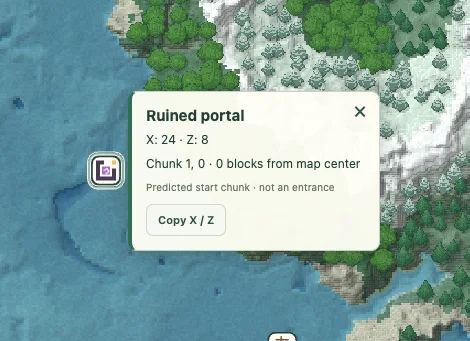
- Check what the marker represents. It marks the center of a predicted start chunk, not an entrance, an exact game
/locateanchor or a completed structure outline. - Compare nearby results. The list is ordered by straight-line distance from the search center. Terrain and hazards can make the nearest result a longer journey.
- Open the location. Use View to center the map there. Click its icon for a coordinate popup, or save a map view for later.
- Confirm in-game. Match the selected Java version, seed and default generation before relying on the prediction.
Which structures can I search for?
| Dimension | Supported candidates | Useful distinction |
|---|---|---|
| Overworld | Village, desert pyramid, jungle temple, ocean monument, ancient city, trial chambers, stronghold, shipwreck, ruined portal, pillager outpost, igloo, woodland mansion, ocean ruin, swamp hut, trail ruins, mineshaft, buried treasure | Some are underground; a surface map cannot show their interiors or depth. |
| Nether | Nether fortress, bastion remnant, ruined portal | Use coordinates from the Nether, not an unconverted Overworld position. |
| End | End city | A city prediction is not a guarantee about a ship or its loot. |
For more specific guidance, use the ancient city finder or bastion finder.
Read the markers separately from the terrain
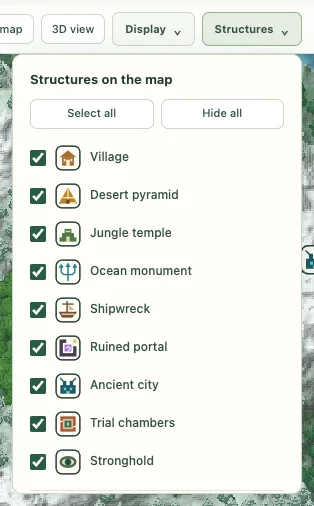
Fresh maps show all supported structure types. Open Structures and uncheck the types you do not need. Click outside the menu when you finish. The legend highlights sampled biomes in the current view; it does not search the whole world for the nearest biome.
For an underground target, X/Z gives the horizontal area to investigate. The height read from an Overworld surface point describes the landscape above it, not the structure floor. The separate biome-slice view can show the sampled biome at a chosen Y, but it still does not reveal rooms or safe tunnels.
Before you report a mismatch
Check the numeric seed, Java version, dimension and coordinate signs. Older chunks in upgraded worlds, custom datapacks, mods and non-default generation can differ from a fresh matching world. Only versions listed in the selector are supported. Trial chambers require Java 1.21 or newer; they are not offered for Java 1.20.6.
This tool does not search for ores, loot or individual blocks. Shipwrecks include beached and ocean variants; ruined portals are available in the Overworld and Nether. Unlisted structures are not included. See Help & troubleshooting to prepare a clear comparison.