
SEEDMAPKIT
Minecraft bastion finder
Find predicted bastion remnant start chunks near a chosen Nether location in Java 1.21.1.
Search using Nether coordinates
Enter your numeric world seed and keep Nether and Bastion remnant selected. Set the center to your current Nether X and Z or another Nether location you want to investigate. The search uses a 2,048-block radius in that dimension.
Do not paste an Overworld position unchanged and assume it is the corresponding Nether location. This form does not convert portal coordinates or predict where a portal will connect. Enter the coordinates from the dimension you intend to search.
Try the pictured search
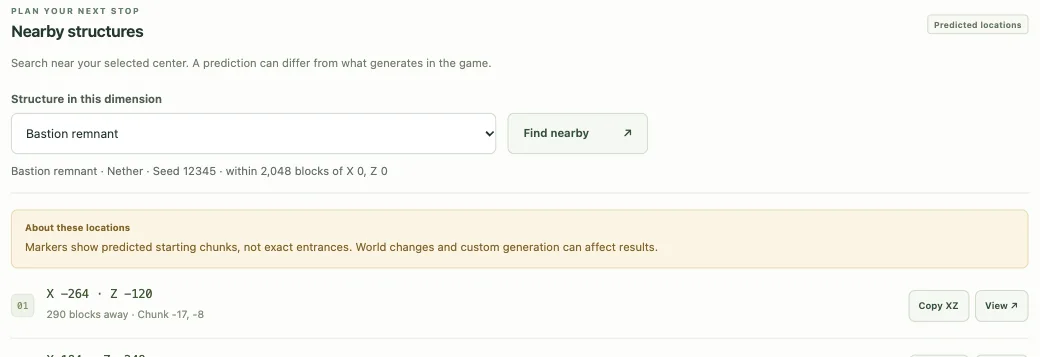
For seed 12345, the search from Nether X 0, Z 0 returns a first candidate at X −264, Z −120, about 290 Nether blocks away. It lies west and north of that center, in chunk −17, −8. Open this example search to see the same list. The distance does not describe a tunnel or a safe route across lava.
Read the map as a biome slice
The Nether view is a horizontal biome slice at the selected Y height. Change Slice height · Y and select Render map if you want to examine a different level. It is not a reconstruction of the Nether ceiling, lava lakes, tunnels or finished bastion walls. A route that looks short across a flat map can cross substantial hazards in the game.
Structure icons are independent of that visual layer. The bastion symbol marks a candidate start chunk; it does not provide an entrance, a safe landing point, a floor height or a complete building outline.
Open or copy a bastion result
- Compare the listed candidates, which are ordered by straight-line distance from the search center.
- Use View to center the map on a candidate and click its icon for X/Z and chunk coordinates.
- Copy XZ or save the view before returning to Minecraft. Keep the coordinate signs.
- Confirm the prediction in a matching default Java 1.21.1 world and plan the actual approach in-game.
The popup distance is measured from the map center, not automatically from your character. If you want a comparison from your current position, enter that position as the center first.
Bastion layouts and loot are not shown
Bastions can have different layouts. This tool does not classify the layout, reconstruct interiors or predict chest contents. It also does not locate individual ores, guarantee a particular item or determine whether a route is safe.
A bastion and a Nether fortress are separate structure types. Change the selection in the general structure finder if you want fortress candidates, or use the map’s Structures menu to compare both types together.
If a prediction does not match
Check the seed, dimension, default generation and Java 1.21.1 version first. This finder does not support Bedrock or modded generation. Previously generated chunks from an older version can differ from a fresh world using the same seed.
No returned candidates means none were returned inside the current radius. Move the center and try another area. A returned marker is still a candidate rather than a simulation of the complete structure.
For a reproducible mismatch, collect the coordinates and world settings using Help & troubleshooting. Read the official bastion introduction for background on the structure’s different layouts.