
SEEDMAPKIT
Minecraft ancient city finder
Search for predicted ancient city start chunks around a chosen Overworld location in Java 1.21.1.
Enter your seed and search area
Enter your numeric world seed, keep Ancient city selected and set Center X and Center Z to your starting area. The search covers 2,048 blocks around that point. Use your own coordinates if you are planning a journey from a base; X 0, Z 0 is only the world origin.
Select Find on map to open the matching view and list candidate locations. Results are ordered by straight-line horizontal distance from the search center. Use View to center the map on one candidate or Copy XZ to keep its coordinates.
Try the pictured search
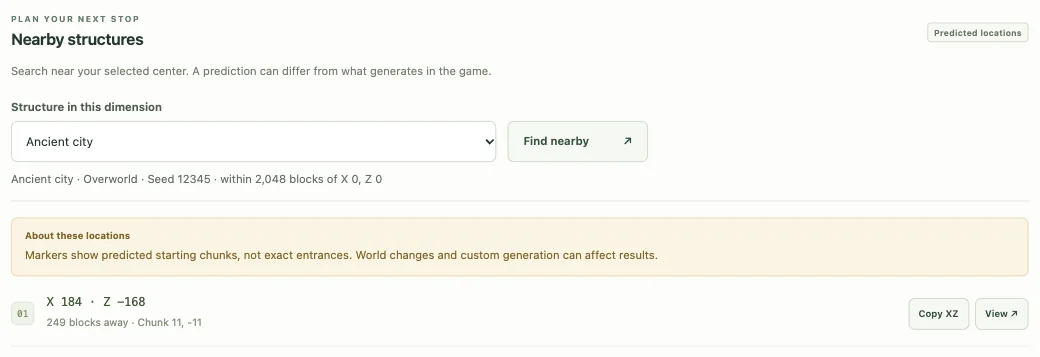
With seed 12345 and a search center of X 0, Z 0, the first result shown below is X 184, Z −168, about 249 blocks away. Those signs place it east and north of the search center. The starting chunk is 11, −11. Open this example search to compare the list with its marker. These are the tool’s predicted coordinates; the screenshot does not show an excavated city.
Why the city is not drawn on the surface
Ancient cities are underground in the deep dark, as described in the official Minecraft ancient city guide. Its marker identifies a horizontal area to check; it does not imply that the structure is visible on the landscape above it. The terrain view shows the base Overworld surface, and the height from a surface-point inspection belongs to that landscape, not the city floor.
To examine underground biomes, open Map view, choose Biome slice, enter a Y height and render again. A slice samples biome data at that level. It still does not show the city’s rooms, corridors, cave entrances, loot or a safe route down. Do not treat an illustrated surface tree or slope as a precise entrance.
Read the block and chunk coordinates
The popup provides block X/Z, chunk X/Z and distance from the current map center. A chunk is a 16 × 16 horizontal block area. For negative coordinates, the containing chunk is rounded downward: block X −1 belongs to chunk X −1, not chunk 0.
The reported point is the center of a predicted start chunk. It may differ from an in-game locate anchor or the point where you first enter the structure. Moving the map center changes the displayed distance without changing the candidate’s world coordinates.
No results or a missing city?
No candidate within this search radius does not mean that no ancient city exists elsewhere in the seed. Move the center to another region and search again. If you are checking a result in-game, confirm the exact seed, default Java 1.21.1 generation and the same dimension.
A world upgraded from another version can contain older chunks. Custom generation, mods and Bedrock worlds are outside this finder’s supported scope. The candidate algorithm does not simulate the complete finished structure, so a marker remains a prediction to verify.
Save the city location for later
Save a named view or copy a shareable link when you want to return to a candidate. Include the game version and dimension when discussing a result with another player. Only share a seed you are comfortable disclosing.
Use Help & troubleshooting to prepare a comparison, or return to the structure finder to search for a different destination. The official Minecraft structures overview provides game background.