
MINECRAFT · JAVA 1.21.1
Minecraft ocean monument finder
Locate predicted ocean monuments and compare a sea approach, nearby land and a return route before diving.
Set up the search
Enter your numeric seed for a default Java 1.21.1 world. This form starts with Ocean Monument in the Overworld. Set Center X and Center Z to the area you want to search, then choose Find on map. The finder looks within 2,048 blocks of that center and orders predicted locations by horizontal distance.
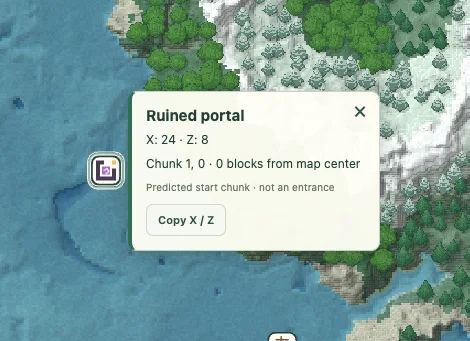
Use View to center on a result and Copy XZ to keep its horizontal coordinates. The marker identifies a predicted starting chunk. It does not identify an entrance, promise a complete structure or supply its internal layout.
Read the water around the marker
Ocean monuments are underwater structures associated with deep ocean biomes. Minecraft’s monument guide describes guardians, elder guardians and the preparations needed for a visit. This finder narrows the horizontal search; it does not certify water depth, entrances or the safety of a dive.
Use the surrounding biome colors to understand the region, then inspect a nearer view. Estimated water in the terrain layer is not a survey of every seabed block. A point over the monument does not tell you the floor Y level.
Compare a launch point with the destination
A useful monument plan has two locations: a place to leave from and the structure itself. Search from your coast or base, open a candidate, then note nearby land and the return direction. The nearest monument by straight-line distance may not be the easiest boat journey.
For a worked planning example, a target 600 blocks east and 800 blocks north is 1,000 horizontal blocks from your starting point. That arithmetic does not include detours or diving. Keep the start coordinates in a separate saved view rather than relying on a distance that changes when you recenter.
Prepare for the actual structure
The official monument article recommends considering a boat and underwater breathing preparations. Use the game itself to inspect the approach and decide your equipment. The map does not model your air supply, guardian positions, Mining Fatigue or blocks other players have removed.
If your goal is a building or farm project, verify the exact structure and surrounding ocean in the world before transporting supplies. A marker alone is not enough evidence for a major construction decision.
Monument, ocean ruin and shipwreck are different targets
An ocean monument result is not an ocean ruin or a shipwreck. This site has a separate shipwreck finder. Do not interpret a missing monument result as a lack of underwater features generally.
If a candidate looks close to a coast or a biome boundary, compare it carefully in the matching world. A sampled color boundary and a finished structure are different kinds of information. Include both the candidate coordinates and the in-game observation if you report a discrepancy.
Check a result and keep the context
Confirm the seed, Java 1.21.1, dimension and the generation history of the target chunks. If the location matters to a long-term plan, compare it in a separate matching world before committing. A surface tree or block texture is an illustration, not a surveyed entrance.
Save a named view or copy a full map link with the seed and coordinates. For a discrepancy, include the map point and the position checked in-game using Help & troubleshooting. See the compatibility checklist when an older or modified world differs.
Game background: Minecraft’s ocean monument information.
Keep exploring
All Minecraft seed guides · Map controls with screenshots · Troubleshoot a mismatch